

AutoCAD has long been a cornerstone tool in architecture and engineering, but its application in fashion design represents a fascinating intersection of precision technology and creative expression. As the fashion industry increasingly embraces digital design workflows, many emerging designers and established studios question whether investing in AutoCAD for fashion applications justifies the cost and learning curve. This comprehensive review explores the capabilities, limitations, and real-world value proposition of using AutoCAD specifically for fashion design and garment development.
The shift toward digital design tools in fashion has accelerated dramatically over the past decade. Designers who once relied exclusively on sketching and draping techniques now leverage sophisticated software to streamline production, reduce sampling waste, and accelerate time-to-market. AutoCAD, primarily known for technical drawing in construction and product design, offers certain advantages for fashion professionals seeking precision pattern-making and technical specifications. However, fashion-specific software alternatives present compelling competition, making this investment decision nuanced and highly dependent on individual workflow requirements and business scale.
Understanding AutoCAD’s Fashion Applications
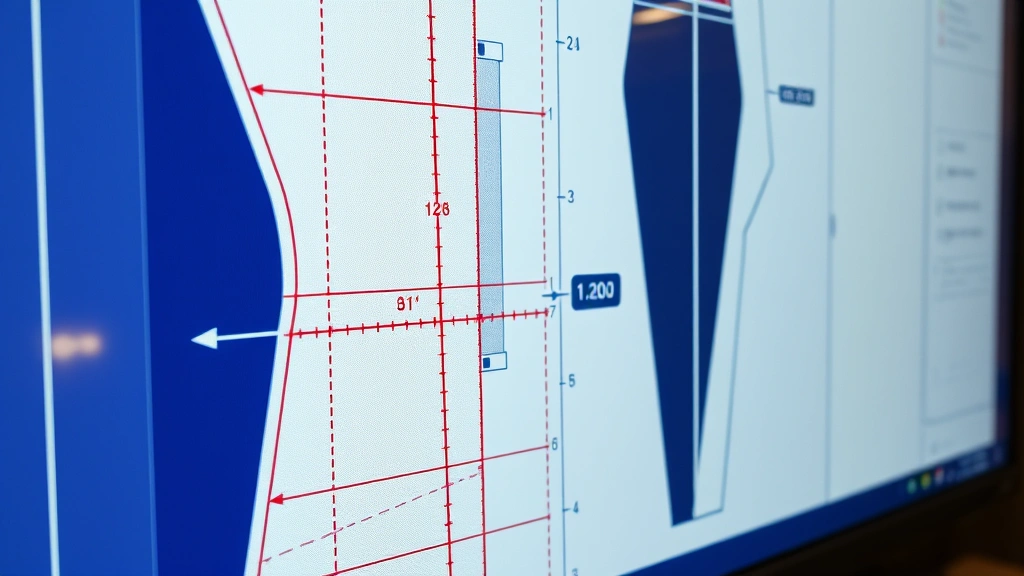
AutoCAD functions as a powerful technical drawing and design tool that fashion professionals can adapt for garment pattern creation, specification sheets, and technical flats. Unlike design-focused software, AutoCAD excels at creating precise, scalable technical drawings with exact measurements—a critical requirement in professional fashion production. When you’re developing patterns that must maintain consistency across multiple sizes and manufacturing facilities, AutoCAD’s precision capabilities become invaluable.
The software’s strength lies in its ability to generate accurate technical specifications and grading (the process of scaling patterns up and down in size). Fashion houses producing multiple sizes from XS to XL require pattern grading that maintains proper proportions and fit. AutoCAD’s mathematical precision ensures that when you grade a pattern, all the relationships between measurements remain correct. This is particularly important for different fashion types and silhouettes, each with unique grading requirements.
Many fashion design studios use AutoCAD primarily for the technical backend of design—the specification sheets, pattern layouts, and production documentation that manufacturers need. While designers might sketch initial concepts in traditional media or digital illustration software, AutoCAD handles the technical execution. This hybrid approach leverages each tool’s strengths: creative conceptualization in one medium, technical precision in another.

Core Features for Fashion Design
AutoCAD offers several features particularly relevant to fashion professionals. The software’s layer system allows designers to organize pattern pieces, seam lines, grain lines, and notches in a manageable hierarchical structure. This organizational capability becomes essential when working with complex garments featuring multiple components. A single jacket pattern might include front pieces, back pieces, sleeves, collar, facings, and lining—each requiring precise placement and measurement.
The dimensioning tools in AutoCAD enable designers to annotate patterns with exact measurements, seam allowances, and construction notes. These technical specifications are crucial for communication with manufacturers who may be located across the globe. Clear, precise specifications eliminate ambiguity and reduce costly revisions. Additionally, AutoCAD’s ability to create blocks and symbols allows designers to establish reusable pattern components, significantly accelerating workflow when designing multiple related styles.
The software’s export capabilities mean you can generate production-ready files in various formats, from PDFs for printing to formats compatible with industrial cutting machines. This integration with manufacturing equipment represents significant practical value for brands operating their own production facilities or working closely with manufacturers. Many best fashion design schools now incorporate AutoCAD training specifically because manufacturers increasingly expect files in this format.
AutoCAD’s parametric design features allow for intelligent pattern modifications. Rather than manually redrawing when measurements change, parametric relationships maintain consistency. If you adjust a waistline measurement, dependent measurements automatically update, preventing cascading errors throughout your pattern. This feature is particularly powerful for designers creating multiple colorways and fabrications of the same style.
Cost Analysis and Pricing Models
AutoCAD’s pricing structure requires careful analysis for fashion industry application. Autodesk offers several subscription models: monthly ($65/month), annual ($580/year), or three-year ($1,470 total). For freelance designers or small studios, these costs represent significant investment. The annual subscription costs roughly $580, while three years costs $1,470—pricing that demands clear ROI justification.
Beyond the software subscription, consider training costs. While AutoCAD has extensive online resources and community support, professional training courses range from $200-$1,000 depending on depth and instructor reputation. Fashion-specific AutoCAD training may cost more due to specialized instruction. Additionally, many designers require time investment—potentially 40-80 hours—to develop proficiency with the software’s fashion-specific applications.
For comparison, fashion-specific software like CLO 3D, Gerber’s WebPDM, or Lectra’s Kaledo typically ranges from $500-$5,000+ annually depending on features and licensing. Some fashion professionals argue that specialized software, while potentially more expensive, offers faster learning curves and workflow optimization specifically designed for fashion. However, if your studio already uses AutoCAD for other purposes—architecture, product design, or technical documentation—the marginal cost of utilizing it for fashion work becomes negligible.
The true cost equation depends on volume and application. A solo designer creating occasional technical flats might find AutoCAD’s cost unjustifiable when free or low-cost alternatives exist. A design studio producing 50+ styles monthly, already using AutoCAD for other functions, finds the cost entirely reasonable. Scale determines value proposition significantly.
Comparison with Fashion-Specific Software
Fashion-specific software solutions like CLO 3D represent the primary competition to AutoCAD adoption. CLO specializes in 3D garment visualization, allowing designers to see how fabrics drape and interact with the body in virtual environments. This capability is revolutionary for design iteration—designers can virtually test silhouettes, proportions, and fabrications before creating physical samples. AutoCAD, conversely, functions in 2D technical drawing space, lacking this three-dimensional visualization.
Gerber Technology’s PGM (Pattern Generation Module) and Lectra’s Kaledo focus specifically on pattern creation and grading, offering automation and intelligence that AutoCAD requires manual implementation to achieve. These specialized tools include extensive pattern libraries, automatic seam allowance application, and integration with cutting and marking systems used in professional manufacturing. AutoCAD requires more manual work to accomplish similar results.
However, AutoCAD’s advantage lies in versatility and broader applicability. If you work across multiple disciplines—perhaps designing fashion while also creating technical documentation for product development—AutoCAD’s universality provides efficiency. Additionally, AutoCAD’s massive user base means extensive community support, countless tutorials, and broad industry familiarity. Finding AutoCAD expertise is easier than finding specialists in niche fashion software.
The decision between AutoCAD and fashion-specific software hinges on workflow priorities. If 3D visualization and design iteration are paramount, specialized software excels. If precision technical documentation and production specifications are priorities, AutoCAD performs admirably. Many professional studios actually use both—specialized software for design development, AutoCAD for technical specifications and production documentation. This hybrid approach leverages each tool’s strengths.
Learning Curve and Training Requirements
AutoCAD presents a moderate learning curve for experienced designers but steeper for those entirely new to technical software. The interface, while logical once understood, requires time investment to master. Basic pattern creation—simple rectangular pieces with measurements—takes relatively little time to learn. Complex applications like nested pattern layouts, advanced grading, and production-ready specifications require deeper expertise.
Fashion designers transitioning from traditional sketching and draping find AutoCAD’s logical, precision-focused approach somewhat counterintuitive initially. The software rewards exactness and planning—you cannot freehand sketch organically as you might on paper. This represents both limitation and advantage: limitation because creative spontaneity is constrained, advantage because precision is guaranteed. Many designers discover this constraint actually refines their design thinking, forcing explicit consideration of proportions and measurements.
Professional training programs specifically addressing fashion applications of AutoCAD exist but remain limited compared to general AutoCAD training. Some fashion design schools incorporate AutoCAD into curricula, providing structured learning. Online resources from Autodesk and community forums offer substantial guidance, though finding fashion-specific tutorials requires more searching than general AutoCAD instruction.
The timeline to basic competency—creating simple patterns with accurate measurements—typically spans 20-40 hours for designers with technical aptitude. Achieving professional-level efficiency, including complex grading and production-ready specifications, requires 60-100+ hours. This investment timeline should factor into cost-benefit analysis, particularly for those considering AutoCAD alongside maintaining existing workflows and design methodologies.
Real-World Implementation Success Stories
Numerous fashion brands successfully integrate AutoCAD into their design and production workflows. Contemporary brands producing technical, minimalist designs—particularly those emphasizing precision and fit—find AutoCAD particularly valuable. Sportswear and activewear brands, where fit specifications are scientifically critical, frequently utilize AutoCAD for pattern development and grading. The precision these brands require aligns perfectly with AutoCAD’s capabilities.
Established brands that already utilize AutoCAD across organizational functions—design, product development, technical documentation—often extend its use to fashion applications naturally. The software becomes integrated into existing systems and processes, creating efficiency across departments. Designers working within these ecosystems find AutoCAD proficiency essential for career advancement and effective collaboration.
Custom and bespoke fashion makers also report strong AutoCAD utility. When creating one-of-a-kind garments with precise measurements and complex construction, AutoCAD’s ability to document specifications and create detailed construction drawings proves invaluable. Luxury brands producing limited-edition pieces find that AutoCAD documentation maintains standards and enables reproduction or modification if clients request variations.
Manufacturing-focused operations particularly benefit from AutoCAD adoption. Brands owning production facilities or closely partnering with manufacturers find that AutoCAD-generated files integrate seamlessly with industrial equipment and manufacturing workflows. The ability to export production-ready files, generate cutting layouts, and create precise specifications for factory teams creates measurable efficiency gains. For these operations, AutoCAD’s value proposition is strongest.
Limitations and Challenges
AutoCAD’s primary limitation for fashion design is its lack of 3D visualization and draping simulation. Designers cannot see how patterns translate to three-dimensional garments on bodies until physical samples are created. This limitation means more physical sampling and iteration—costly and time-consuming compared to virtual 3D design workflows. For design-forward brands prioritizing rapid iteration and experimentation, this limitation is significant.
The software’s learning curve, while moderate for technical professionals, can be steep for artistic designers accustomed to intuitive design tools. AutoCAD rewards precision and planning but can feel restrictive to those preferring organic, exploratory design processes. The software’s interface, while logical, requires sustained learning investment that some designers find frustrating.
AutoCAD’s fashion application requires substantial manual work compared to fashion-specific software. Creating graded patterns, applying seam allowances, and generating production specifications all require manual implementation rather than automated intelligence. This manual approach, while offering flexibility, demands more designer time and expertise compared to specialized tools with fashion-built-in logic.
Integration with manufacturing equipment varies based on specific machinery and software. While many industrial cutting systems read AutoCAD files, some specialized equipment prefers proprietary formats or requires conversion steps. This integration complexity can create production delays if not properly managed. Additionally, AutoCAD’s 2D approach means limited compatibility with 3D body scanning and virtual fitting technologies increasingly important in modern fashion.
Collaboration tools in AutoCAD are less fashion-centric than specialized solutions. While the software supports file sharing and version control, fashion-specific collaboration features—sample tracking, approval workflows, feedback integration—are limited compared to purpose-built fashion software platforms. Teams requiring sophisticated design collaboration infrastructure may find AutoCAD’s capabilities insufficient.
Who Should Invest in AutoCAD for Fashion
AutoCAD represents an excellent investment for specific fashion professional profiles. Technical designers and pattern makers—those whose primary responsibility involves creating accurate patterns and specifications—find AutoCAD valuable. If precision technical documentation is your core function, AutoCAD’s investment is justified. Similarly, fashion professionals working in sportswear, activewear, or technical apparel benefit strongly from AutoCAD’s precision capabilities.
Brands already utilizing AutoCAD across organizational functions should absolutely leverage it for fashion applications. If your company uses AutoCAD for architecture, product design, or technical documentation, extending its use to fashion eliminates redundant software investments and creates organizational efficiency. Training team members on fashion-specific applications costs far less than adopting entirely new software platforms.
Custom, bespoke, and luxury makers creating limited-quantity, precision-fit garments find AutoCAD’s documentation capabilities valuable. When each piece requires detailed specifications and construction documentation, AutoCAD excels. Similarly, brands owning manufacturing facilities or managing complex supply chains benefit from AutoCAD’s production-ready output and integration with industrial equipment.
Solo freelance designers and small studios without existing AutoCAD investments should carefully evaluate alternatives. If your primary need is design development rather than technical specification, fashion-specific software or even free alternatives might better serve your workflow. However, if you anticipate growing into a studio managing multiple designers and production specifications, AutoCAD’s scalability and versatility justify earlier investment.
Designers focused on conceptual, artistic design with rapid iteration and 3D visualization should consider fashion-specific software instead. AutoCAD’s 2D technical approach doesn’t serve design-forward creative processes as effectively as specialized 3D tools. The software works best for those whose design process emphasizes precision and technical specification over exploratory visualization and iteration.
Educational institutions teaching professional fashion design should incorporate AutoCAD training alongside fashion-specific software. Since many manufacturers expect AutoCAD files, fashion design schools preparing students for industry careers should ensure graduates possess AutoCAD competency. This technical skill significantly improves graduates’ employment prospects, particularly in technical design and production roles.
Professionals interested in developing personal style through technical mastery find AutoCAD valuable for understanding garment construction, pattern logic, and precision fit. The software deepens technical understanding in ways that purely artistic approaches cannot. For designers seeking comprehensive skill development spanning both creative and technical domains, AutoCAD investment pays dividends.
Additionally, brands examining different fashion movements and historical styles find AutoCAD useful for documenting and recreating vintage pattern structures. Understanding how historical garments were constructed requires precise pattern documentation that AutoCAD enables. Fashion historians and vintage reproduction specialists benefit from AutoCAD’s precision for accurate historical documentation.
FAQ
Is AutoCAD cheaper than fashion-specific software?
Generally, yes. AutoCAD’s annual subscription ($580) is less expensive than many fashion-specific platforms like CLO 3D or Lectra’s Kaledo. However, comparing only subscription costs ignores training investments and workflow efficiency. Fashion-specific software often costs more but may deliver faster workflow optimization specifically designed for fashion applications. The true cost comparison requires evaluating your specific workflow and priorities.
Can AutoCAD create 3D designs like CLO 3D?
No. AutoCAD functions as 2D technical drawing software and cannot create 3D garment visualizations or draping simulations. If 3D design visualization is critical to your workflow, AutoCAD alone is insufficient. However, many studios use AutoCAD for technical specifications after completing 3D design work in specialized software, creating a hybrid workflow.
How long does it take to learn AutoCAD for fashion?
Basic competency—creating simple patterns with accurate measurements—typically requires 20-40 hours for designers with technical aptitude. Professional-level efficiency with complex grading and production specifications requires 60-100+ hours. The timeline depends on your technical background, learning style, and existing design experience.
Do manufacturers prefer AutoCAD files?
Many manufacturers accept AutoCAD files, and some prefer them for technical specifications and pattern documentation. However, preferences vary by manufacturer and region. Some prefer specialized fashion software formats or proprietary systems. Before investing in AutoCAD specifically for manufacturer compatibility, confirm your specific manufacturing partners’ file format preferences.
Can I use AutoCAD instead of fashion design software?
AutoCAD can supplement fashion design software but shouldn’t necessarily replace it entirely. AutoCAD excels at technical specifications and precise documentation but lacks 3D visualization and design-forward features. Most professional studios use both—specialized software for design development and conceptualization, AutoCAD for technical production specifications. This hybrid approach leverages each tool’s strengths.
Is AutoCAD necessary for fashion design careers?
Not universally necessary, but increasingly valuable. Design-focused roles emphasizing conceptual creativity may not require AutoCAD. However, technical design, pattern-making, and production roles increasingly expect AutoCAD proficiency. Brands already using AutoCAD across their organization strongly prefer employees with AutoCAD skills. For career advancement in technical fashion roles, AutoCAD competency significantly improves employment prospects.